Getting started with multithreading code
Modern applications perform several tasks at a time, and using only one thread would significantly slow down the system. In many applications, this would often mean that only one user could perform an action at a time. Luckily, in .NET we can easily utilize several threads and make our applications more robust.
Threads & Processes Overview
Before diving into code, it is important to have the basics down. When you execute an application, the OS starts a new process, and it is inside this process that threads are created and destroyed.
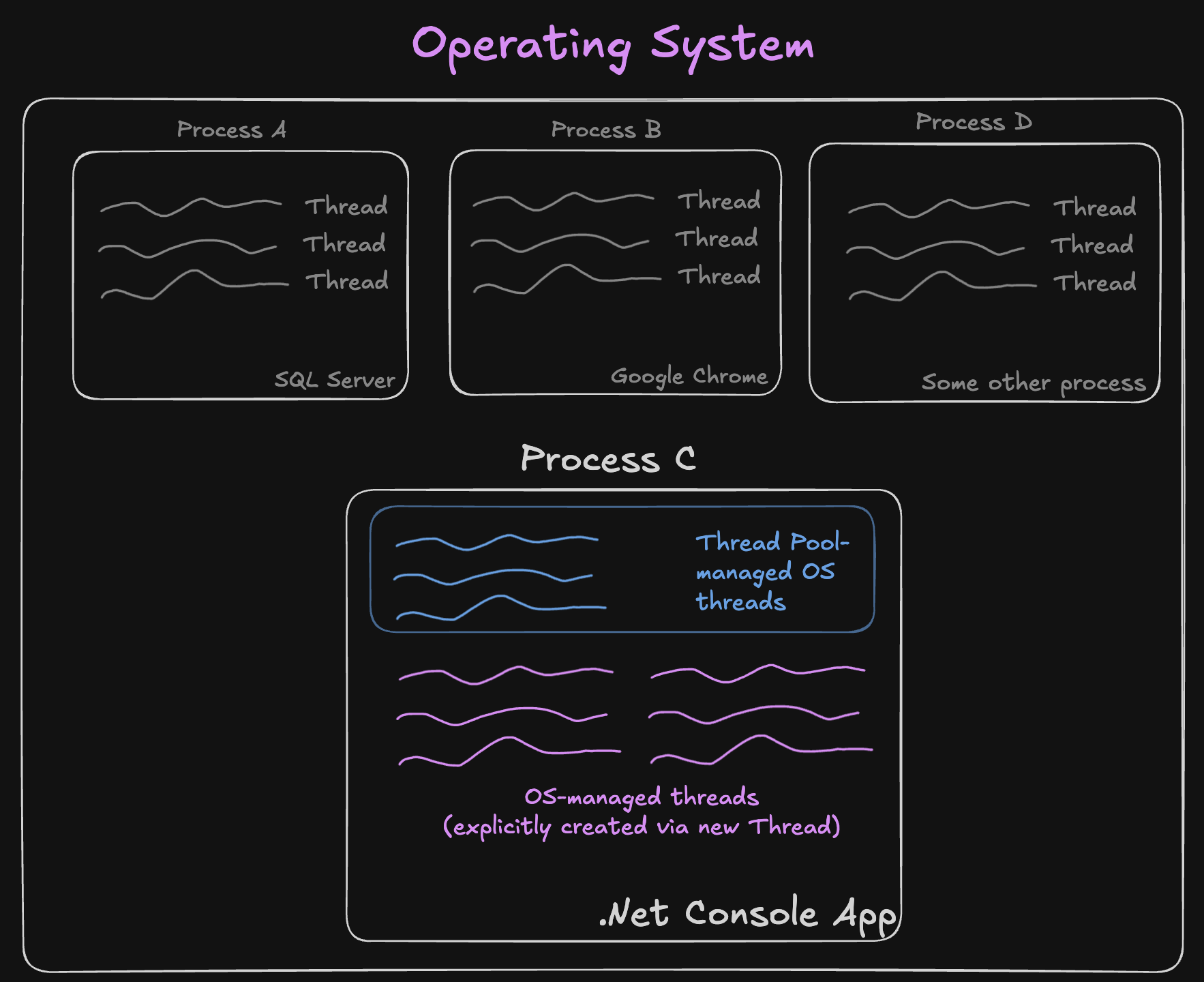
A thread is essentially a set of instructions that a CPU can process. Normally, one CPU core can process one thread at a time, which might give the impression that computers would be very slow, since most CPUs have only, say, 8 to 16 cores. It is thanks to the thread scheduler that computers can run far more threads than they have cores by rapidly switching between them.
This switching is possible because a CPU executes clock cycles extremely fast — this is what the GHz (gigahertz) measurement stands for, or more technically, clock cycles per second. So a CPU running at 3.2 GHz is capable of running 3 billion 200 million clock cycles per second. Note that this is not the same as how often the CPU switches between threads: a context switch (swapping which thread is running on a core) is a relatively expensive operation handled by the OS, and typically happens on the order of thousands of times per second, not billions.
However, do not be tempted to create thousands of threads in each of your applications and think your application will be faster. Each new thread comes with an extra cost: its own stack, synchronization overhead, and the need for thread-safe code.
Using Threads in C#
Once the application is started, there is always one main thread that executes the Main method. In typical GUI applications such as Windows Forms, this thread also represents the UI. Hence, if this thread is busy executing a long-running process, the application is not responsive, and users cannot interact with it.
To avoid this issue, we need to delegate longer tasks to another thread and free the main thread as soon as possible. There are several ways a new thread can be created, but in this introductory article we use the Thread class. It is the lowest-level interaction with threads between a process and the OS in the .NET ecosystem, and threads created this way are not managed by the ThreadPool.
var newThread = new Thread(() => {
    // imitate some long-running task, for example a complex pdf generation.
    Thread.Sleep(4000);
    PrintMessage("Generated PDF");
});

PrintMessage("Before calling a method 'Start'");
newThread.Start();
PrintMessage($"After calling a method 'Start'");


void PrintMessage(string message) =>
    Console.WriteLine($"ThreadId is {Thread.CurrentThread.ManagedThreadId}. {message}");
ThreadId is 1. Before calling a method 'Start'
ThreadId is 1. After calling a method 'Start'
ThreadId is 4. Generated PDF

Process finished with exit code 0.
In the example above, we created a new thread by using the Thread class constructor, which takes a ThreadStart delegate as a parameter. Then, we need to call its Start method to begin execution. The program completes a long-running operation and finishes.
The ThreadStart delegate is essentially the same as Action. It just so happens that the Action and Func delegate signatures were introduced after the initial version of C#.
From the output, we can observe that the application's main thread only calls the newThread.Start method, and it is another thread that handles the long-running process.
Thread properties
You might be wondering: why does the app wait 4 seconds for the non-main thread to complete its task? In other words, why is the process not terminated after the main thread has finished its execution?
Well, it is because an explicitly created thread (using the Thread class constructor) is a non-background (foreground) thread by default, and in .NET, the process keeps running until at least one non-background thread is still executing.
We can verify if the thread is a background thread by using its IsBackground property.
var thread1 = new Thread(() => Console.WriteLine("thread1"));
Console.WriteLine($"thread1 is a background thread: {thread1.IsBackground}");
thread1.Start();
thread1 is a background thread: False
thread1

Process finished with exit code 0.
Additionally, we can set a thread to be a background thread.
var newThread = new Thread(() => {
    // imitate some long-running task, for example a complex pdf generation.
    Thread.Sleep(4000);
    PrintMessage("Generated PDF");
});

newThread.IsBackground = true;
PrintMessage("Before calling a method 'Start'");
newThread.Start();
PrintMessage($"After calling a method 'Start'");


void PrintMessage(string message) =>
    Console.WriteLine($"ThreadId is {Thread.CurrentThread.ManagedThreadId}. {message}");
ThreadId is 1. Before calling a method 'Start'
ThreadId is 1. After calling a method 'Start'

Process finished with exit code 0.
As we can see, this time the non-main thread was set to be a background thread. Because the main thread (which is the only foreground thread now) finished before a background thread could finish, the process terminated, and since threads live inside a process, the long-running thread terminated as well.
The process exits when there are no foreground (non-background) threads left.
There are several other useful properties we can set on a thread, such as:
-
Name— used mostly for debugging purposes. -
Priority— if threads have the same priority, you can never guarantee thread execution order. It is the OS and the thread scheduler that decide the order. However, you can influence it by choosing from five possible priority options.LowestBelowNormalNormalAboveNormalHighest
The thread scheduler will prioritize higher-priority threads and try to send them to the CPU for execution before lower-priority ones.
-
CurrentCulture— controls culture-sensitive, non-UI operations for the thread, such as number, date, and currency formatting, and string comparison/sorting rules. For example, formatting aDateTimeon a thread withCurrentCultureset toen-USproduces8/26/2026, whileen-GBproduces26/08/2026. -
CurrentUICulture— determines which language-specific resources (for example,.resxresource files) are loaded viaResourceManagerfor that thread — in other words, what language your UI text is displayed in. It is independent ofCurrentCulture: you could display a UI in French (CurrentUICulture) while still formatting dates and numbers using UK conventions (CurrentCulture).
Other properties of the Thread class do not define setters, these properties are: ThreadState, IsThreadPoolThread, ManagedThreadId which we have already seen, ExecutionContext, and IsAlive.
In upcoming posts, I will explain ExecutionContext and IsThreadPoolThread, as these concepts are substantial enough to deserve their own post.
For more information on the Thread class, you can refer to the official Microsoft documentation.
Summary
To summarize, operating systems have a thread scheduler that decides which threads get executed on a CPU core and when. Threads only live inside a process (for example, a Google Chrome process), and once a process is terminated, all of its threads are terminated as well.
Creating and managing threads directly with the Thread class, as we did in this article, works, but it is a fairly low-level and manual approach: you are responsible for starting threads, deciding whether they are background or foreground, and coordinating them safely.
For that reason, .NET also provides a higher-level abstraction called Task (in the System.Threading.Tasks namespace), which is commonly used together with async/await to run work without blocking the calling thread. Under the hood, tasks are usually executed on the ThreadPool rather than on dedicated threads you manage yourself. I will cover Task and asynchronous programming in one of the upcoming posts.